
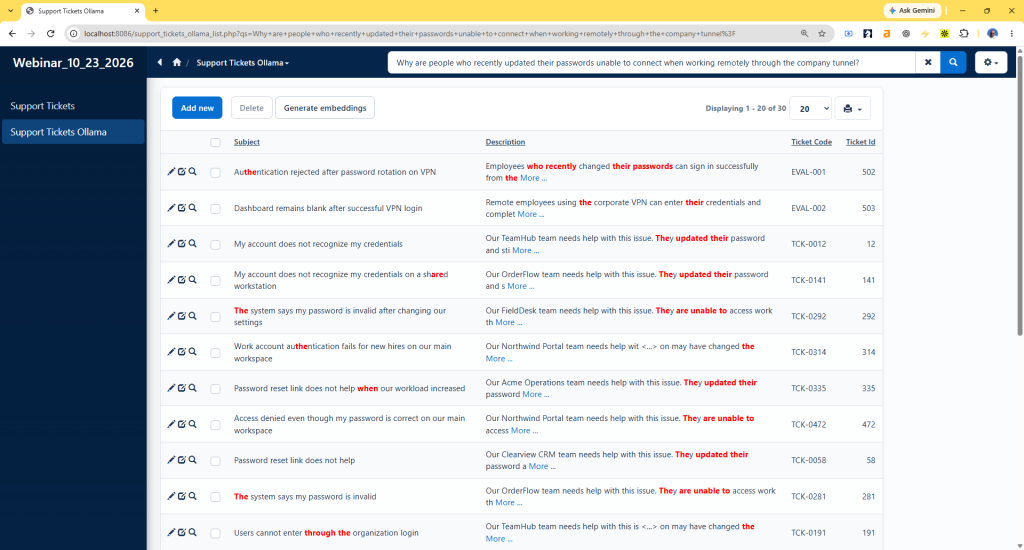
Semantic search does not have to send text to an external embeddings service or calculate similarity in PHP. In this tutorial, we will use ollama.com to generate embeddings locally and MariaDB to store and compare the vectors.
This is a local alternative to our earlier PHPRunner semantic search tutorial. The example searches support tickets by meaning and also checks new tickets for possible semantic duplicates before saving them.
Ollama runs the embedding model on the same computer as the generated application. MariaDB’s VECTOR type stores each 768-value embedding, while VEC_DISTANCE_COSINE() finds the closest records. The ticket text and search phrases remain on the local system.
1. Installing Ollama and the embedding model
Install Ollama from ollama.com/download. This example uses EmbeddingGemma, which requires Ollama 0.11.10 or later.
Open a command prompt and download the model:
Ollama exposes its local API at http://127.0.0.1:11434. Keep Ollama running on the machine that hosts the generated PHPRunner application. PHP also needs the cURL extension enabled.
This tutorial requires MariaDB 11.7 or later because it uses the native VECTOR type and VEC_DISTANCE_COSINE() function.
2. Adding local vector fields
The example continues with the support_tickets table from the previous tutorial. Create a copy for the Ollama version, then add the local vector and hash fields:
Add support_tickets_ollama to the PHPRunner project. On its SQL Query screen, add a calculated field named semantic_query:
Do not display embedding_local, embedding_hash_local, or semantic_query on the generated pages. Make semantic_query searchable so its normal search condition can be replaced by the semantic-search result IDs.
Turn off ‘Highlight search results’. Semantic matches often use different words, so ordinary keyword highlighting is not useful here.
3. Adding the Ollama embedding function
Open Events – Global events – After App Init and add this code:
The function sends text to the local Ollama API and returns a JSON representation of the 768-value vector. The same model and text format must be used for stored ticket embeddings and search embeddings.
4. Generating embeddings for existing tickets
Open the support_tickets_ollama List page in Page Designer and add a button named ‘Generate embeddings’. Open its Server event and add the following code:
Open the button’s Client After event and display the returned progress message:
The button processes up to 100 records each time it is clicked. Continue until the message reports that all tickets have local embeddings.
MariaDB requires an indexed vector column to be NOT NULL. After all existing records have embeddings, make the column required and create a cosine vector index:
The index uses the same cosine distance function as the semantic-search query. Without a matching cosine index, MariaDB performs a full table scan.
5. Replacing basic search with local semantic search
Open the support_tickets_ollama List page – Before process event and add this code:
The event sends the search phrase to local Ollama, then MariaDB compares the returned vector with embedding_local. The 30 closest ticket IDs replace the calculated field’s normal search condition. Repeating the same query within five minutes uses the session cache.
6. Sorting tickets by similarity
Open the support_tickets_ollama List page – Before SQL query event and add this code:
The event checks the three closest existing tickets. A cosine distance of zero means identical direction, so the code converts distance to similarity with 1 – distance. The 0.93 threshold is an experimental starting point; test it against your own records and adjust it to balance missed duplicates and false warnings.
8. Refreshing the vector after an edit
Open the support_tickets_ollama Edit page – Before record updated event and add this code:
The stored hash identifies whether the subject or description has changed. Editing other ticket fields keeps the current vector and avoids an unnecessary Ollama request.
Rebuild the application and use the ‘Generate embeddings’ button until every existing ticket has a local vector. A natural-language phrase in the List page’s basic search box should now return tickets with the closest meaning. When a user submits a ticket that is very similar to an existing record, the Add event stops the insert and displays the possible match.
PakarPBN
A Private Blog Network (PBN) is a collection of websites that are controlled by a single individual or organization and used primarily to build backlinks to a “money site” in order to influence its ranking in search engines such as Google. The core idea behind a PBN is based on the importance of backlinks in Google’s ranking algorithm. Since Google views backlinks as signals of authority and trust, some website owners attempt to artificially create these signals through a controlled network of sites.
In a typical PBN setup, the owner acquires expired or aged domains that already have existing authority, backlinks, and history. These domains are rebuilt with new content and hosted separately, often using different IP addresses, hosting providers, themes, and ownership details to make them appear unrelated. Within the content published on these sites, links are strategically placed that point to the main website the owner wants to rank higher. By doing this, the owner attempts to pass link equity (also known as “link juice”) from the PBN sites to the target website.
The purpose of a PBN is to give the impression that the target website is naturally earning links from multiple independent sources. If done effectively, this can temporarily improve keyword rankings, increase organic visibility, and drive more traffic from search results.
Streaming Film
Nonton Film gratis
Jasa Backlink
Download Anime Batch