
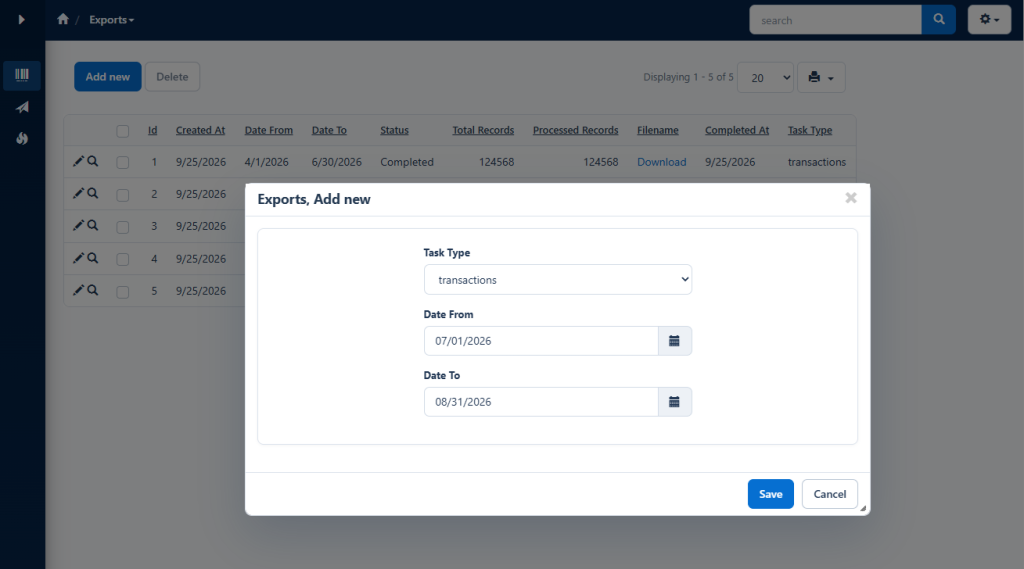
Exporting hundreds of thousands of records during a normal page request can exceed PHP execution limits and leave the user waiting without any indication of progress.
This PHPRunner tutorial moves large CSV exports into a scheduled worker. Users submit an export request, the worker processes a fixed number of records per run, and the List page shows progress until the ZIP file is ready to download.
1. Creating the export queue
Create an exports table and add it to the PHPRunner project. This example supports two export types and optional date limits.
On the Add page, show date_from, date_to, and task_type. Configure task_type as a Lookup wizard with the fixed values orders and transactions. Keep the worker-managed fields off the Add and Edit pages.
2. Queuing a new export
Open Exports Add page – Before record added and add:
The user only creates a queue record. No export data is generated during the Add request.
3. Adding the scheduled worker
Create cron.php in the generated application folder. This example uses MySQL syntax and processes up to 100,000 rows during each run. Change $recordsPerRun if the server needs smaller batches.
The worker uses an allowlist in $exportTypes, so a value stored in task_type cannot become an arbitrary table name. Each run resumes at processed_records. The status changes to ‘Completed’ only after the ZIP file has been created.
The PHP Zip extension must be enabled. The web-server account also needs write permission to the generated application’s exports folder.
4. Scheduling the worker
Schedule the generated application’s cron.php with the PHP command-line executable. For example, a Linux cron job that runs every minute can use:
Use the equivalent scheduled-task command on Windows. Do not configure overlapping runs. The script rejects web requests, so it cannot be started by visiting its URL.
5. Displaying progress on the List page
Add status, total_records, processed_records, filename, and completed_at to the Exports List page.
Open Exports List page – JavaScript OnLoad and add:
The page refreshes every ten seconds, but it does not interrupt a user who has an Add, Edit, or View popup open.
6. Adding the download link
Open the filename field’s View as settings, select Custom, and add:
Rebuild the project, submit an export request, and run the scheduled worker. The record should move from ‘Pending’ to ‘Processing’, the processed count should increase after each batch, and the download link should appear after the ZIP file is complete.
PakarPBN
A Private Blog Network (PBN) is a collection of websites that are controlled by a single individual or organization and used primarily to build backlinks to a “money site” in order to influence its ranking in search engines such as Google. The core idea behind a PBN is based on the importance of backlinks in Google’s ranking algorithm. Since Google views backlinks as signals of authority and trust, some website owners attempt to artificially create these signals through a controlled network of sites.
In a typical PBN setup, the owner acquires expired or aged domains that already have existing authority, backlinks, and history. These domains are rebuilt with new content and hosted separately, often using different IP addresses, hosting providers, themes, and ownership details to make them appear unrelated. Within the content published on these sites, links are strategically placed that point to the main website the owner wants to rank higher. By doing this, the owner attempts to pass link equity (also known as “link juice”) from the PBN sites to the target website.
The purpose of a PBN is to give the impression that the target website is naturally earning links from multiple independent sources. If done effectively, this can temporarily improve keyword rankings, increase organic visibility, and drive more traffic from search results.
Streaming Film
Nonton Film gratis
Jasa Backlink
Download Anime Batch