
We’re pleased to announce the release of Gravity Forms 3.2.3. This release includes a variety of updates and fixes including…
- Added security enhancements.
- Added a Large (mobile friendly) input size to the form block style settings for improved accessibility.
- Updated to offer updates for inactive official Gravity Forms Add-Ons.
New Large (mobile friendly) input size
Gravity Forms 3.2.3 adds a new Large (mobile friendly) option to the input size setting in the form block’s style settings. It sits alongside the existing Small, Medium, and Large sizes and makes inputs, radio buttons, and checkboxes bigger and easier to tap.
To use it, select your Gravity Forms block in the WordPress editor and open the Block tab in the sidebar. Under Input Styles, open the size dropdown and choose Large (mobile friendly).
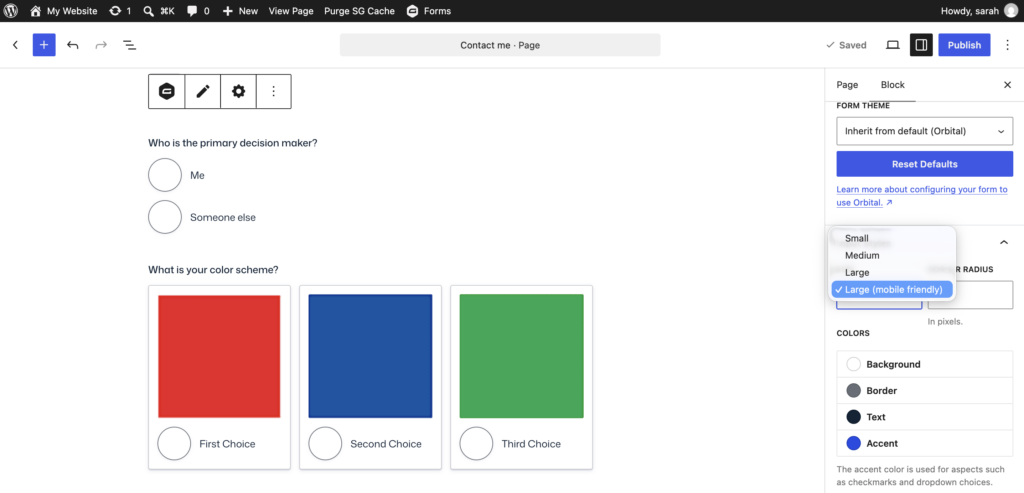
Larger inputs make your forms easier to use on phones and tablets, and they help visitors with limited dexterity or vision select the right choice the first time. It’s a quick way to make your forms more accessible without writing any custom CSS.
More reasons to love Gravity Forms:
- Intuitive form builder – Easily create custom forms using our visual drag-and-drop editor – no coding required.
- Ready-to-use templates – Get started fast with a collection of prebuilt, customizable form templates for common use cases.
- Powerful integrations – Extend your forms with add-ons that connect to leading CRMs, payment processors, email marketing tools, and more.
- Developer-friendly documentation – From basic tutorials to advanced customization guides, our comprehensive docs are here to help every step of the way.
- Responsive expert support – Have a question? Our knowledgeable support team is here to help you troubleshoot and succeed.
- Email reliability with Gravity SMTP – Improve email deliverability by connecting your WordPress site to trusted email services. Gravity SMTP is included free with the Elite license.
Want to try Gravity Forms before purchasing your license? Try a free online demo.
Gravity Forms 3.2.3 changelog
- Added security enhancements.
- Added a Large (mobile friendly) input size to the form block style settings for improved accessibility.
- Updated the Option field’s Product setting to list only Product fields in the same container.
- Updated to offer updates for inactive official Gravity Forms Add-Ons.
- Fixed a performance issue that can occur when Full_Screen_Handler::get_form_for_display() is called multiple times during a request.
- Fixed an issue that causes multiple admin-ajax.php config requests to be sent unnecessarily in some situations.
- Fixed an issue that prevented setting type and page settings for new confirmations via filter gform_confirmation_settings_fields.
- Fixed an issue where custom fields using non-GravityForms icons do not render in the drag preview when moving the field.
- Fixed an issue where in some situations, the Next button is changed into a Submit button after a page is revealed by conditional logic.
- Fixed an issue where the Month and Year dropdown values in the Datepicker are left-aligned in desktop Safari.
- Fixed an issue where the multi-file uploader isn’t functional when the entry detail edit page is accessed using the edit link on the entries list page.
- Fixed an issue where validation errors could flash or receive focus before a successful AJAX redirect.
- API: Fixed an issue where a settings field or section that depends on a checkbox with the array data format stayed hidden when the expected choice was selected.
Gravity Forms 3.2.3.1 changelog
- Fixed an issue where checking for updates to inactive add-ons made more requests to the Gravity Forms API than required.
Note: After updating, clear your site’s cache to ensure you’re running the latest version. We also recommend excluding pages that include Gravity Forms from caching and script optimization, as cached form pages can interfere with dynamic population, field validation, honeypot, and add-ons that rely on time-sensitive tokens.
Read our FAQ on Cache and Script Optimizer Issues for details and exclusion steps by host/plugin.
PakarPBN
A Private Blog Network (PBN) is a collection of websites that are controlled by a single individual or organization and used primarily to build backlinks to a “money site” in order to influence its ranking in search engines such as Google. The core idea behind a PBN is based on the importance of backlinks in Google’s ranking algorithm. Since Google views backlinks as signals of authority and trust, some website owners attempt to artificially create these signals through a controlled network of sites.
In a typical PBN setup, the owner acquires expired or aged domains that already have existing authority, backlinks, and history. These domains are rebuilt with new content and hosted separately, often using different IP addresses, hosting providers, themes, and ownership details to make them appear unrelated. Within the content published on these sites, links are strategically placed that point to the main website the owner wants to rank higher. By doing this, the owner attempts to pass link equity (also known as “link juice”) from the PBN sites to the target website.
The purpose of a PBN is to give the impression that the target website is naturally earning links from multiple independent sources. If done effectively, this can temporarily improve keyword rankings, increase organic visibility, and drive more traffic from search results.
Streaming Film
Nonton Film gratis
Jasa Backlink
Download Anime Batch